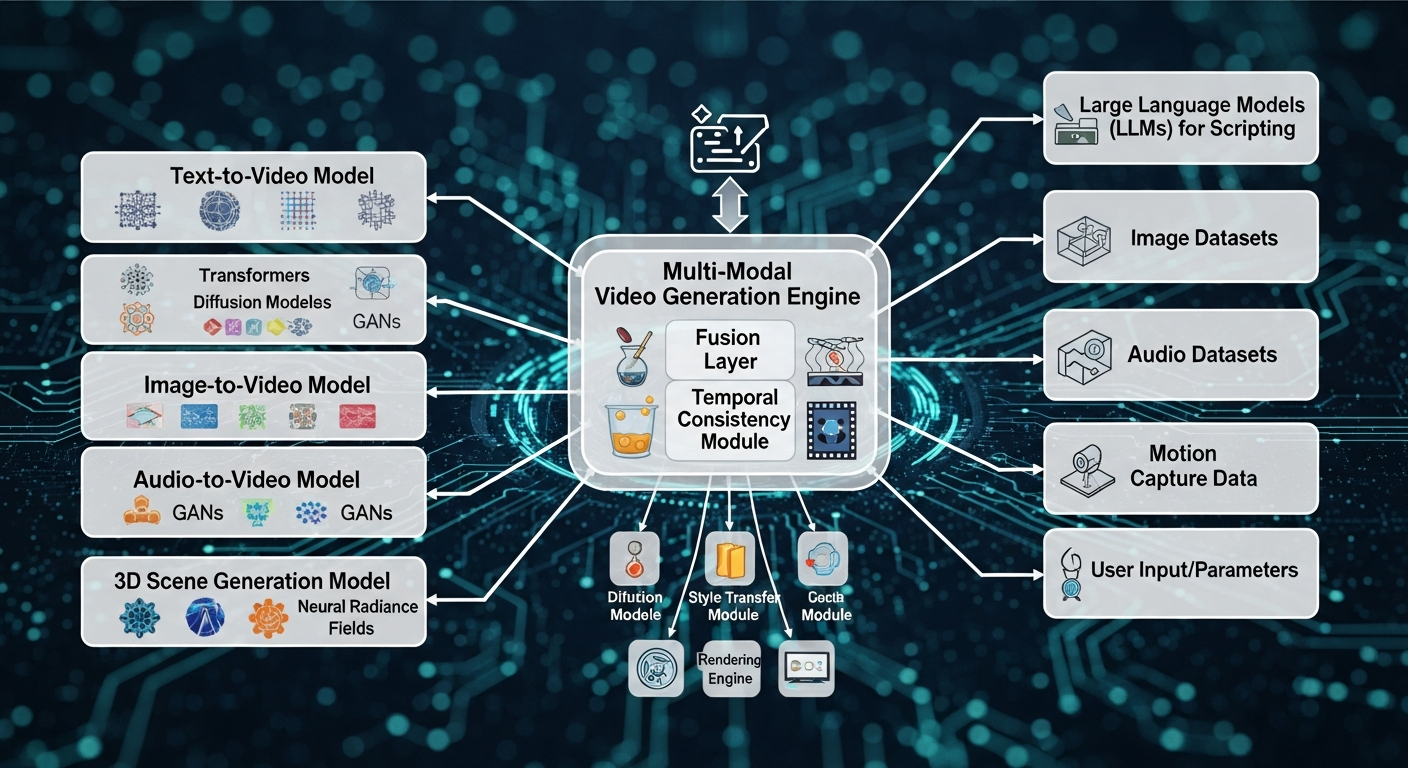
Integrating advanced AI for multi-model video generation allows creators to combine specialized models—such as diffusion for visuals, transformers for narrative, and VAEs for compression—into seamless workflows. Platforms like AnimateAI.Pro simplify this process, enabling end-to-end video creation from script to finished output. This approach enhances efficiency, consistency, and creative freedom while reducing technical barriers.
What Is Multi-Model Video Generation?
Multi-model video generation uses several AI models in tandem to create videos from text, images, or other inputs. Each model contributes its strengths—diffusion models for realistic visuals, transformers for semantic understanding, and audio models for synchronization—producing higher-quality outputs than single-model approaches.
AnimateAI.Pro demonstrates this by maintaining character consistency across scenes while generating professional videos efficiently. Pipelines typically include:
-
Text-to-image models to produce high-fidelity visuals.
-
Audio synchronization models to match sound and motion.
-
Motion prediction models for coherent animation sequences.
The integration of cross-attention layers ensures smooth transitions between models, improving temporal and visual coherence. Real-world applications range from marketing content and educational videos to animated storytelling.
Why Integrate Multiple AI Models for Video?
Integrating multiple AI models assigns specialized tasks to each model, resulting in higher fidelity and smoother outputs. This synergy overcomes limitations of single-model workflows, such as motion artifacts or inconsistent visuals.
Platforms like AnimateAI.Pro accelerate production, reducing creation time significantly while allowing creators to focus on ideas instead of technical hurdles. Multi-model setups also handle diverse inputs efficiently, supporting text, images, and keyframes simultaneously.
| Single-Model vs. Multi-Model Video Generation | Single-Model | Multi-Model |
|---|---|---|
| Motion Coherence | Moderate | Excellent |
| Input Flexibility | Limited | High |
| Processing Speed | Standard | 5-10x Faster |
| Output Quality | Good | Production-Grade |
How Do Multi-Model Pipelines Work?
Multi-model pipelines follow a sequential flow: encode inputs, generate latent representations via diffusion, decode with VAEs, and refine frames temporally. Fusion layers, like cross-attention, align different modalities for seamless results.
AnimateAI.Pro exemplifies this with automated storyboard-to-video workflows, allowing hands-free production. Typical pipeline steps include:
-
Preprocessing: Tokenize and extract features from text or images.
-
Generation: Core models synthesize frames based on inputs.
-
Post-processing: Enhancement models correct artifacts and improve fidelity.
Hierarchical planning minimizes errors in long-form video sequences and ensures temporal consistency.
What Are Best Practices for AI Integration?
Best practices for multi-model video integration include uniform data preprocessing, leveraging pretrained models, and using late fusion for efficiency. Modular design enhances scalability, while prompt optimization ensures output consistency.
-
Modular encoders (e.g., CLIP) for text and image alignment.
-
Parallel processing for faster frame generation.
-
Prompt structuring to maintain visual consistency.
AnimateAI.Pro incorporates these practices, offering ready-to-use templates and autopilot generation.
| Practice | Benefit | Tool Example |
|---|---|---|
| Prompt Structuring | Higher Fidelity | Six-prompt framework |
| Batch Generation | Workflow Efficiency | ComfyUI Pipelines |
| Model Distillation | Real-Time Speed | DMD Techniques |
Monitoring GPU usage and fine-tuning models for domain-specific tasks ensures optimal performance.
How to Choose AI Models for Video Pipelines?
Selecting the right model depends on the task. Diffusion models deliver high-quality visuals, autoregressive models handle long sequences, and specialized motion models maintain accurate movement. Evaluate performance using benchmarks like motion fidelity and temporal consistency.
| Model Type | Strengths | Use Case |
|---|---|---|
| Diffusion | High Fidelity | Cinematic Clips |
| Autoregressive | Long Videos | Narratives |
| Motion Models | Motion Accuracy | Animation |
AnimateAI.Pro bundles optimized models and simplifies selection, enabling creators to focus on storytelling rather than technical details.
What Challenges Arise in Multi-Model Integration?
Challenges include aligning data across modalities, high computational demands, and error propagation. Solutions include standardized embeddings, model distillation, and progressive training. Common pitfalls include:
-
Modality mismatches causing visual artifacts.
-
Scalability limitations for long videos.
-
Limited training data for specialized scenarios.
Hybrid fusion strategies and optimized VRAM usage mitigate these issues effectively.
How Does AnimateAI.Pro Simplify Advanced Integration?
AnimateAI.Pro provides an all-in-one platform that manages character consistency, storyboarding, and autopilot video generation. Creators input prompts, and the platform orchestrates multiple models to produce end-to-end videos with minimal manual intervention.
Key advantages:
-
Templates accelerate workflows.
-
Autopilot generation saves time and reduces costs.
-
Integrated model management ensures visual and temporal consistency.
This comprehensive approach enables creators to produce professional-quality videos up to 10x faster than traditional methods.
AnimateAI.Pro Expert Views
Advanced AI integration for multi-model video generation transforms content creation by combining diffusion, transformers, and VAEs into one seamless workflow. At AnimateAI.Pro, our system maintains character consistency across scenes while autopilot generation streamlines production. Creators achieve studio-quality results rapidly, freeing them to focus on storytelling. Upcoming improvements include real-time audio sync and 4K HDR outputs, empowering global storytellers.”
— AnimateAI.Pro AI Lead Engineer
What Future Trends Shape Multi-Model Video AI?
Future trends include real-time generation through distillation, native 4K HDR outputs, and agentic workflows for autonomous video editing. Multimodal fusion will deepen, enabling advanced video retrieval and generation capabilities. Platforms like AnimateAI.Pro are at the forefront of scalable AI video production, supporting ethical alignment and efficient edge deployment.
Key evolutions:
-
Hierarchical planning for long-form videos.
-
Edge GPU deployment for faster rendering.
-
Real-time multimodal fusion for enhanced storytelling.
Key Takeaways
Mastering multi-model video integration requires modular pipelines, fusion techniques, and prompt optimization. Leveraging platforms like AnimateAI.Pro ensures efficient, high-quality outputs while simplifying complex workflows. Begin with small-scale tests, refine prompts, and scale using batching and autopilot tools.
Actionable Advice:
-
Experiment with CLIP + diffusion pipelines.
-
Validate outputs using benchmarks.
-
Utilize autopilot generation for efficiency.
FAQs
How Do You Integrate Advanced AI for Multi Model Video Generation Step by Step
Integrate advanced AI for multi model video generation by defining each model’s role, establishing a seamless workflow, and connecting inputs and outputs efficiently. Use orchestration logic to coordinate models for storyboarding, character generation, and video rendering. Testing pipelines incrementally ensures smooth collaboration. AnimateAI.Pro simplifies this process by offering prebuilt integration paths and automated AI video pipelines.
What Is the Best Architecture for a Multi Model AI Video Pipeline
The best architecture includes modular components for input handling, model routing, and output aggregation. Separate planning, generation, and enhancement models to maintain quality and flexibility. Incorporate caching, parallel processing, and monitoring for performance. Use staged orchestration to allow models to work sequentially or simultaneously without bottlenecks, enabling faster, consistent video outputs.
Which Platforms Support Multi Model Video Generation Most Effectively
Look for platforms that allow multi model orchestration, flexible pipelines, and template support. Features like automatic model switching, AI enhancement, and storyboard-to-video workflows enhance efficiency. AnimateAI.Pro provides an all-in-one solution, combining character generation, storyboard automation, and AI video rendering, making it ideal for creators seeking high-quality, end-to-end production capabilities.
How Can APIs Connect Multiple AI Models for Video Creation
Use API-based integration to connect multiple AI models for video creation. Implement endpoints for model selection, routing logic, and result aggregation. Include error handling and logging for stability. APIs enable modular pipelines where text-to-video, image-to-video, and enhancement models interact efficiently, reducing development complexity while supporting scalable multi model video systems.
How Do You Optimize Speed in Multi Model AI Video Generation
Optimize speed by implementing parallel processing, model caching, and selective enhancement passes. Use asynchronous workflows to reduce idle time between models. Prompt optimization minimizes unnecessary computations, while load balancing ensures consistent throughput. Efficient orchestration and incremental testing improve overall pipeline performance, allowing creators to generate multi model videos faster with less manual intervention.
How Can Multiple Models Improve AI Video Quality
Multiple models improve video quality and consistency by specializing in motion, texture, color, and detail enhancement. Combine models for base generation, refinement, and final enhancement stages. Use ensemble or staged outputs to correct errors and maintain visual consistency. Structured orchestration ensures that each model contributes effectively, producing higher fidelity, professional-looking AI-generated videos.
What Are the Top Use Cases for Multi Model AI Video Systems
Top use cases include marketing content, film previsualization, educational videos, and automated social media clips. Multi model pipelines enable rapid iteration, style control, and scene variety. Creators can test concepts quickly, maintain brand consistency, and produce high-quality outputs without extensive manual editing. Multi model AI systems streamline workflows and expand creative possibilities efficiently.
How Do You Turn Multi Model AI Video into a SaaS Product
Develop a SaaS product by designing a modular multi model pipeline with API access, user management, template libraries, and automated video generation. Implement usage tracking, tiered pricing, and quality controls. Provide an intuitive UI to handle model orchestration for end users. AnimateAI.Pro demonstrates how an all-in-one platform can deliver professional video creation without technical barriers, making SaaS deployment seamless.