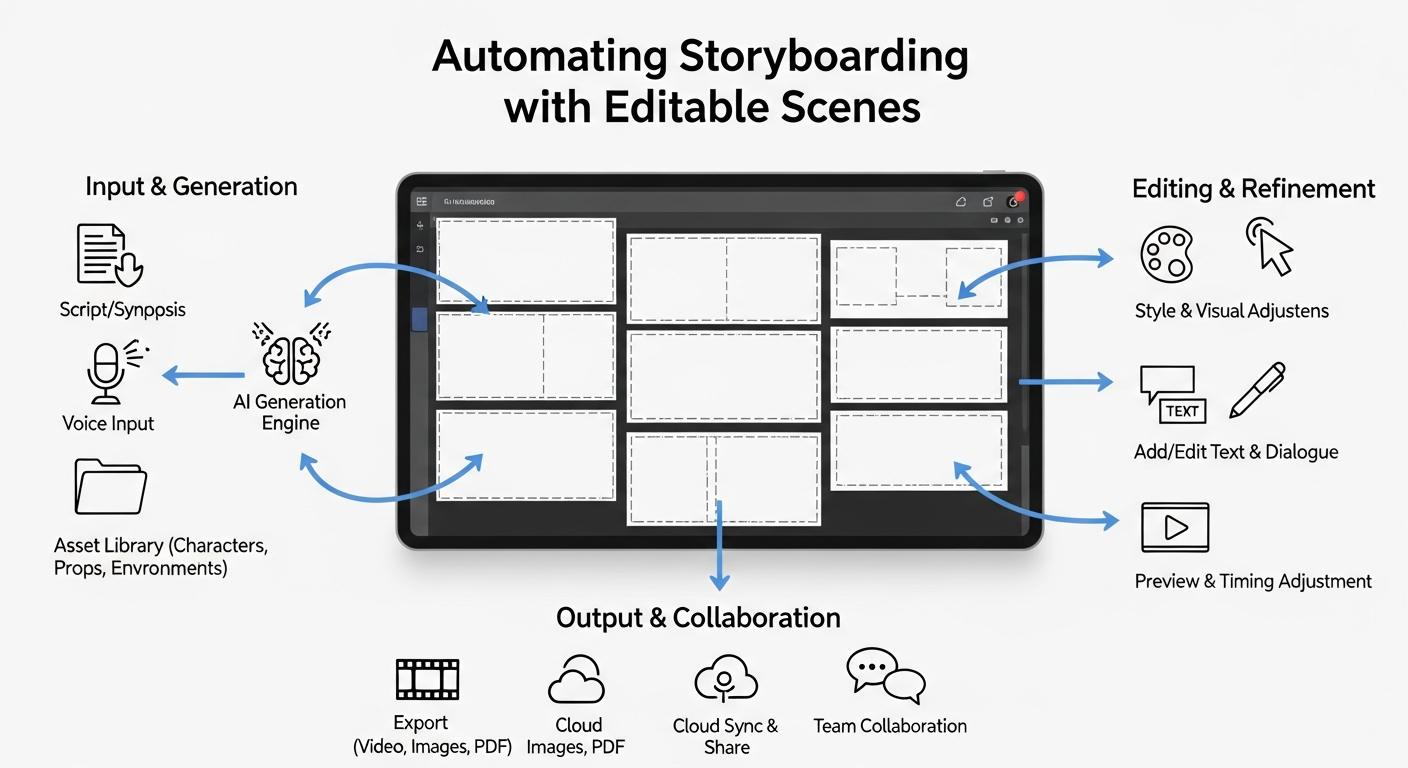
Storyboard automation transforms written scripts into fully editable visual sequences with AI-generated scenes and narration. Animate AI streamlines this process, allowing creators to maintain character consistency, adjust visuals, and produce professional outputs quickly. By leveraging AI tools, teams can save time, enhance creativity, and move seamlessly from concept to finished video, all within one integrated platform.
What Is Storyboard Automation?
Storyboard automation uses AI to convert scripts into visual storyboards with editable scenes and synchronized narration. It breaks text into individual shots, generates corresponding images, and adds voiceovers automatically. This approach accelerates pre-production while preserving creative control, making it ideal for filmmakers, marketers, and content creators.
Workflows typically start with script upload, followed by AI-powered scene generation. Users can tweak frames, swap characters, and adjust narration. Platforms like Animate AI maintain visual consistency across all scenes, cutting manual drawing time by up to 90%. This ensures faster iteration and smooth collaboration.
| Feature | Manual Storyboarding | AI Automation |
|---|---|---|
| Time Required | Hours to days | Minutes |
| Editability | Limited revisions | Real-time adjustments |
| Narration | Separate recording | AI-generated |
| Cost | High (artists) | Low (subscription) |
How Does Storyboard Automation Work?
AI-driven storyboard automation analyzes scripts to identify visuals, actions, and dialogue. It generates images for each scene, applies editable layers, and integrates narration. Users can refine outputs in real time, adjusting frames, camera angles, and visual styles.
Advanced platforms like Animate AI offer autopilot modes for hands-free video generation. The system parses scripts, creates images via AI models, and applies text-to-speech narration. This end-to-end automation significantly reduces production time while ensuring professional results.
What Are the Best Tools for Editable Storyboards?
Top solutions include Animate AI, Katalist, and StoryboardHero. They provide unlimited scene generations, consistent characters, and export capabilities. Animate AI distinguishes itself with prebuilt templates, autopilot video generation, and AI character enhancement.
When choosing a tool, consider editing flexibility, narration quality, and platform integration. Animate AI enables polished, editable storyboards suitable for both individual creators and teams.
| Tool | Editable Scenes | Narration | Pricing |
|---|---|---|---|
| Animate AI | Yes | AI voices | Subscription |
| Katalist | Dynamic frames | Basic | Free trial |
| StoryboardHero | Script edits | Optional | Agency plans |
How to Create a Script for Automation?
Scripts should be concise, including scene headers, actions, and dialogue. Each shot should be described in 1-2 sentences for clarity. Proper formatting—INT/EXT markers, character actions, and transitions—helps AI interpret content accurately.
Animate AI automatically refines prompts to generate editable visuals with synced narration, ensuring that creators can move smoothly from concept to storyboard.
Which Features Make Scenes Editable?
Editable storyboards require drag-and-drop frames, character consistency locks, layer editing, and style transfer. Narration syncs through timeline adjustments, while versioning supports collaborative workflows. Refresh functions allow selective regeneration of scenes without restarting the entire storyboard.
Animate AI enhances scene editing by enabling prompt-based adjustments for visuals and voice, speeding up iteration cycles while preserving professional quality.
How to Add Narration to Automated Storyboards?
AI text-to-speech converts script dialogue into narration that aligns with each scene. Users can modify voice, tone, and timing for natural delivery. Animate AI integrates voice enhancement to maintain a consistent, professional sound across the storyboard. Lip-sync alignment ensures animatics are pitch-ready for production.
What Are Common Challenges in Automation?
Typical challenges include inconsistent character design, ambiguous script parsing, and style mismatches. These issues can be resolved through detailed prompts, reference imagery, and iterative regeneration. Animate AI’s autopilot functionality reduces errors, while templates provide reliable starting points for complex projects.
How to Export and Use Storyboards Professionally?
Storyboards can be exported as PDFs, videos, or platform-compatible formats with branding. They serve for pitches, previs, or production planning. Animate AI allows direct video generation from editable storyboards, including shot lists, timings, and cloud-based sharing for team feedback. This facilitates faster approvals and smoother transitions to full production.
Animate AI Expert Views
Storyboard automation with editable scenes and narration is reshaping how creators work. Animate AI enables scripts to become fully customizable storyboards instantly, maintaining character consistency and narrative flow. With AI-driven autopilot video production, creators achieve high-quality outputs faster, while editable workflows support iterative improvements without manual overhead.”
— Animate AI Product Lead
Why Choose Animate AI for Storyboarding?
Animate AI offers comprehensive automation with editable scenes, AI narration, and seamless video export. Ready-to-use templates accelerate production, and advanced AI models ensure consistent visual quality. It caters to creators of all levels, from marketers to filmmakers, streamlining the transition from concept to animated video.
To maximize efficiency, start with well-structured scripts, leverage editable features, and test free trials to refine workflows. Use iterative prompts and early exports for feedback, scaling to full video production for maximum impact.
FAQs
Can beginners use storyboard automation?
Yes, user-friendly interfaces and templates allow anyone to upload scripts and edit visuals effortlessly with Animate AI.
Does automation support custom styles?
Absolutely, you can provide reference images to maintain consistent aesthetics across all scenes.
How long does it take to generate a storyboard?
Generating 10–20 scenes typically takes 1–5 minutes, depending on script complexity.
Is narration editable after generation?
Yes, voice, timing, and script can be adjusted directly in the timeline.
Can teams collaborate on storyboards?
Most platforms offer real-time sharing, annotations, and version tracking for seamless collaboration.